Jeremy’s IT Lab lecture video:
Commands
Commands List
DHCP Show Commands
15. DHCP
Link to original
- show ip dhcp binding
-->Shows all DHCP clients which are currently assigned IP addressesDHCP Global Config Commands
DHCP Global
Link to original
- ip dhcp excluded-address low-address high-address
-->Specifies the range of addresses that won’t be given to DHCP clients- ip dhcp pool pool-name
-->Initiates a DHCP pool and enters DHCP pool configuration mode or enters DHCP pool configuration if the pool already exists
- network ip-address { /prefix-length
|subnet-mask }-->Specifies the subnet of addressed to be assigned to clients (Except the excluded addresses)- lease time { days hours minutes
|infinite }-->Specifies the DHCP IP address lease time- default-router ip-address
-->Specifies the default gateway that the DHCP clients should use- dns-server ip-address
-->Specifies the DNS server that DHCP clients should use- domain-name domain-name
-->Specifies the domain name of the network- option 43 ip ip-address
-->Enables Option 43 for DHCP clients, which can be used to tell the APs the IP address of their WLCDHCP Interface Commands
DHCP Interface
Link to original
- ip helper-address ip-address
-->Configures the current interface as a DHCP relay agent (meant to be used on the interface that’s connected to the DHCP clients)- ip address dhcp
-->Tells the router to get an IP address from the DHCP server for this specific interfaceWindows IP-related Commands
IP Configuration Commands
IP Configuration Commands
Link to original
- Windows: ^networking-commands-windows
- General
- arp -a
-->Shows the ARP list- Ping host-name/ip-address [-n number-of-pings]
-->Pings the host or IP address with the specified number of pings- nslookup domain-name
-->Performs a DNS query to look up the domain name’s actual IP address- ipconfig
- ipconfig (General) ^ipconfig-general-windows
- ipconfig
-->Shows basic IP config info- ipconfig /all
-->Shows detailed IP config info- ipconfig (DNS) ^ipconfig-dns-windows
- ipconfig /displaydns
-->Displays information about the DNS cache- ipconfig /flushdns
-->Deletes the DNS cache- ipconfig (DHCP) ^ipconfig-dhcp-windows
- ipconfig /renew
-->Gets a new IP address via DHCP- ipconfig /release
-->Releases the PC’s DHCP learned IP address
DHCP Info
DHCP General Information
Dynamic Host Configuration Protocol (DHCP) is a protocol that allows hosts to automatically/dynamically learn various aspects of their network configuration without manual configuration, including information such as:
- IP address
- Subnet mask
- Default gateway
- DNS server
- DHCP is typically used for ‘client devices’, while devices like routers, servers and etc, are manually configured
- DHCP servers run on port 67 while DHCP clients run on port 68.
What devices are usually DHCP servers?
- In small networks (like homes and small offices), the router usually acts as the DHCP server.
- In large networks, a dedicated server usually running Windows/Linux acts as the DHCP server.
DHCP server leasing
DHCP servers ‘lease’ IP addresses to clients.
This means that any IP addresses assigned to clients are not permanent, and the client must give up the address at the end of the lease.
DHCP DORA Steps
For a DHCP client to contact and get information from the DHCP server, it has to go through four steps sometimes called ‘DORA’ for short:
- DHCP Discover
- DHCP Offer
- DHCP Request
- DHCP Ack
1. DHCP Discover
A DHCP Discover is the first message that clients send when they are looking for a DHCP server to connect to. Some of the message properties are:
- It is a broadcast message
- The source MAC is the client’s MAC address
- The destination MAC is the broadcast MAC address (ffff.ffff.ffff)
- The source IP is 0.0.0.0
- The destination IP is the broadcast IP address (255.255.255.255)
The message contains some general information about the client for the DHCP server to use, like whether the client wants the response messages sent back to be unicast or broadcast, or if the client would like a specific IP address.
2. DHCP Offer
The DHCP Offer message is sent by the DHCP server after receiving a DHCP Discover message. It offers an IP address to the client. Some of the message properties are:
- It can be a broadcast or a unicast message.
- The source MAC is the server’s MAC address
- The destination MAC is the client’s MAC address, which the server learned from the Discover message.
- The source IP is the IP address of the server
- The destination IP is the IP address that’s being offered to the client
3. DHCP Request
The DHCP Request is a message that is sent from the client to a DHCP server, informing the server that it is requesting the IP address that has been previously offered to it. Some of the message properties are:
- It is a broadcast message
- The source MAC is the client’s MAC address
- The destination MAC is the broadcast MAC address (ffff.ffff.ffff)
- The source IP is 0.0.0.0
- The destination IP is the broadcast IP address (255.255.255.255)
In the DHCP Request message, the client uses an option called ‘Option 54 - DHCP Server Identifier’ to indicate which DHCP server it is communicating with.
4. DHCP Ack
The DHCP Ack message is sent by the DHCP server as a response to the DHCP Request, informing the client that it has accepted its request, and will provide it with the requested IP address. Some of the message properties are:
- It can be a broadcast or a unicast message.
- The source MAC is the server’s MAC address
- The destination MAC is the client’s MAC address, which the server learned from the Discover message.
- The source IP is the IP address of the server
- The destination IP is the IP address that’s being offered to the client
How does a client tell the servers if it wants a unicast or broadcast response?
The client informs the servers if it wants a unicast or broadcast response through the “Bootp flag” that’s contained in the DHCP Discover message.
- If the Bootp flag value is 0x0000 then the response will be unicast.
- If the Bootp flag value is 0x8000 then the response will be broadcast.
Why would the client want a unicast or broadcast response?
Some clients may be configured in a way that does not let them accept unicast packets unless an IP address has already been assigned to them. In that case, the DHCP server is instructed to send the Offer message as a broadcast.
DHCP DORA + Release Table and Summary Image
| Step | Location --> Location | Message Type |
|---|---|---|
| Discover | Client --> Server | Broadcast |
| Offer | Server --> Client | Broadcast or Unicast |
| Request | Client --> Server | Broadcast |
| Ack | Server --> Client | Broadcast or Unicast |
| Release | Client --> Server | Unicast |
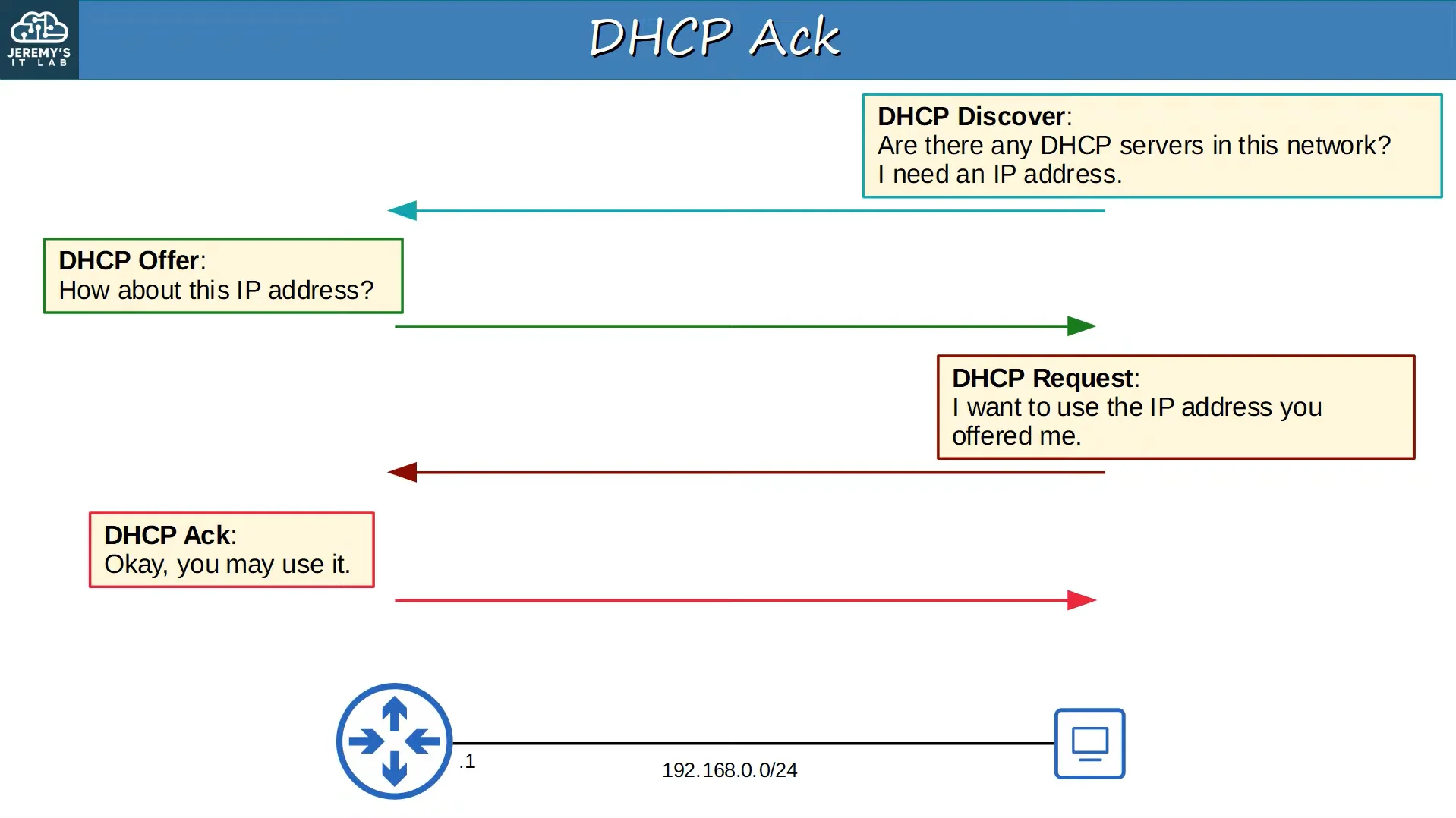 |
|---|
| DORA Summary Image |
DHCP Relay
Smaller networks may opt to use one of the router’s as a DHCP server, but in bigger networks, a centralized DHCP server is often used. This is when DHCP Relays are used.
- Having a centralized DHCP server means that the server won’t be able to receive the clients’ broadcast DHCP messages. (Broadcast messages don’t leave the local subnet)
- To fix this issue, we can configure routers to act as a DHCP relay agent.
- A relay agent will forward the client’s broadcast DHCP messages to the remote centralized DHCP server in the form of unicast messages.
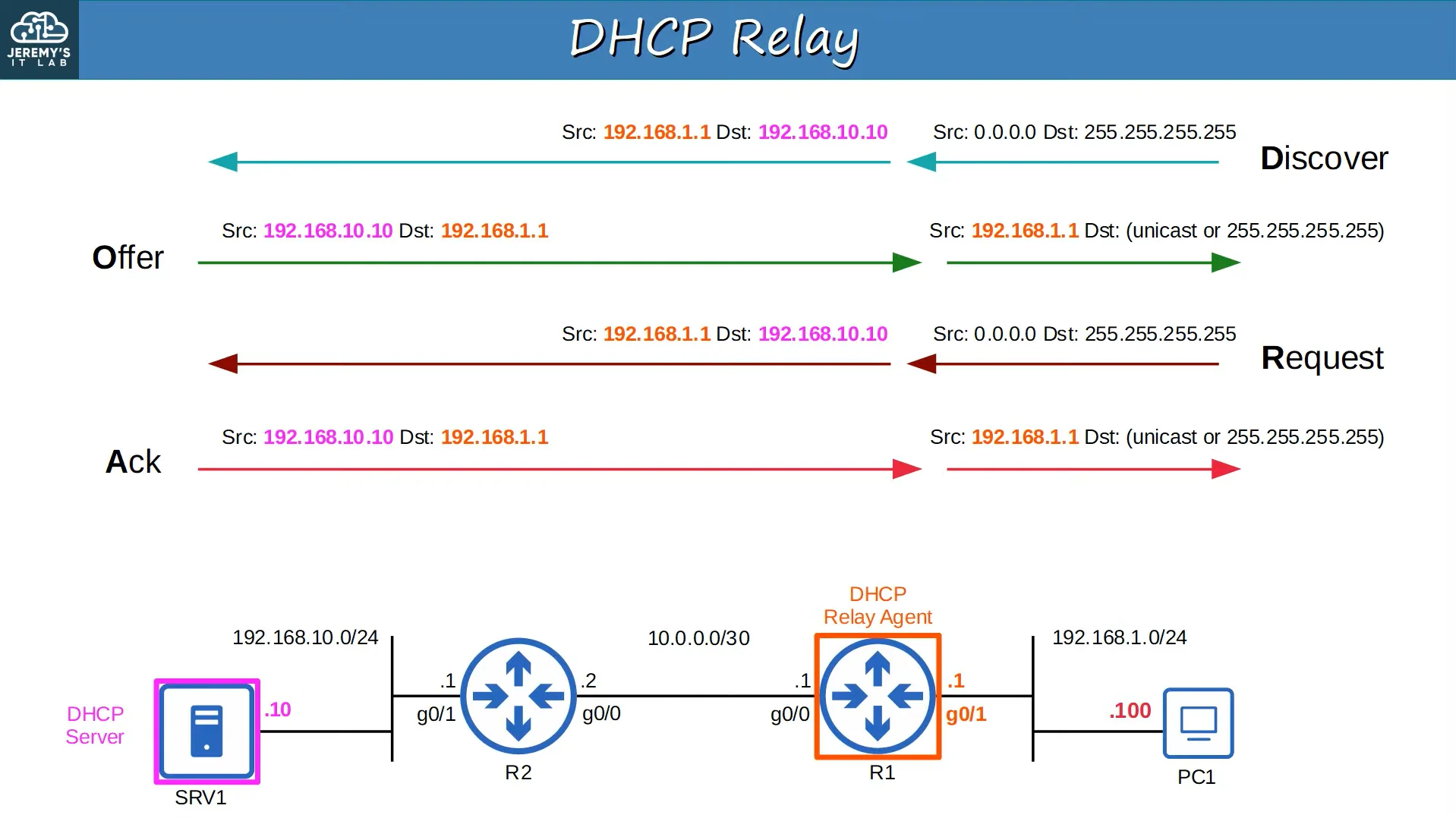 |
|---|
| DHCP Relay Example |
DHCP and Windows OS
There are a few commands you can use on Windows to view DHCP information, as well as release and renew DHCP leases.
ipconfig /all- Shows the IP configuration settings on Windows, including:
- The current IP address and whether it’s ‘preferred’ or not (An IP address being preferred means that it has been assigned to the device by DHCP previously)
- The lease obtain and expiration dates
- The current DHCP server
- Shows the IP configuration settings on Windows, including:
ipconfig /release- Sends a DHCP Release message to the DHCP server, informing it that it’d like to release the current IP address. The DHCP server will now consider this IP address to be free and usable by other devices.
- Some of the Release message’s properties are:
- It is a unicast message.
- The source MAC is the client’s MAC address
- The destination MAC is the server’s MAC address
- The source IP is the current IP address configured on the device
- The destination IP is the IP address of the DHCP server
ipconfig /renew- Initiates a communication with a DHCP server by following the DORA steps.
- By the end of it, the client will have received an IP address from the server.
DHCP Server Configuration in Cisco IOS
DHCP Show Command
There’s one show command to see the hosts which have been assigned an IP through the DHCP protocol
show ip dhcp binding- Shows the hosts that have been assigned an IP address from the DHCP server
- Displays information about the hosts including:
- IP address
- Client ID / MAC address / Username
- Lease expiration date
DHCP Server Configuration
DHCP server configuration is done through some commands in global config mode, and a few through DHCP-config mode.
- Global Config
ip dhcp excluded-address LOW-ADDRESS HIGH-ADDRESS- Specifies the range of addresses that won’t be given to DHCP clients
ip dhcp pool POOL-NAME- Initiates a DHCP pool and enters DHCP pool configuration mode or enters DHCP pool configuration if the pool already exists
- DHCP Config
network IP-ADDRESS { /PREFIX-LENGTH | SUBNET-MASK }- Specifies the subnet of addressed to be assigned to clients (Except the excluded addresses)
dns-server IP-ADDRESS- Specifies the DNS server that DHCP clients should use
domain-name DOMAIN-NAME- Specifies the domain name of the network
default-router IP-ADDRESS- Specifies the default gateway that the DHCP clients should use
lease TIME { days hours minutes | infinite }- Specifies the DHCP IP address lease time
DHCP Router Relay Agent Configuration
To configure a router to be a DHCP relay agent, you’d have to enter the configuration mode of an interface that’s connected to clients and use the following command:
ip helper-address IP-ADDRESS- Configures the current interface as a DHCP relay agent.
- It will then forward DHCP Discover messages to the DHCP server in the form of unicast messages. (Instead of being broadcast)
Jeremy’s IT Lab előadásvideó:
Parancsok
Parancslista
DHCP Show Parancsok
15. DHCP
Eredeti hivatkozása
- show ip dhcp binding
-->Megjeleníti az összes DHCP klienst, amelyekhez jelenleg IP cím van hozzárendelveDHCP Globális Konfigurációs Parancsok
DHCP Globális
Eredeti hivatkozása
- ip dhcp excluded-address low-address high-address
-->Meghatározza azt a címtartományt, amelyet a DHCP szerver nem oszt ki a klienseknek- ip dhcp pool pool-name
-->Létrehoz egy DHCP pool-t és belép a DHCP pool konfigurációs módba (vagy belép egy már meglévő poolba)
- network ip-address { /prefix-length
|subnet-mask }-->Meghatározza a klienseknek kiosztandó alhálózatot (kivéve a kizárt címeket)- lease time { days hours minutes
|infinite }-->Beállítja a DHCP IP cím bérleti idejét (lease time)- default-router ip-address
-->Megadja az alapértelmezett átjárót (default gateway), amit a DHCP klienseknek használniuk kell- dns-server ip-address
-->Megadja a DNS szervert a DHCP kliensek számára- domain-name domain-name
-->Megadja a hálózat domain nevét- option 43 ip ip-address
-->Engedélyezi az Option 43 opciót a DHCP klienseknek (pl. Access Pointoknak megadni a WLC IP címét)DHCP Interfész Parancsok
DHCP Interfész
Eredeti hivatkozása
- ip helper-address ip-address
-->Beállítja az aktuális interfészt DHCP relay agent-ként (a DHCP kliensekhez csatlakozó interfészen alkalmazandó)- ip address dhcp
-->Utasítja a routert, hogy az adott interfészre DHCP szervertől kérjen IP címetWindows IP-vel kapcsolatos Parancsok
IP Konfigurációs Parancsok
IP Konfigurációs Parancsok
Eredeti hivatkozása
- Windows: ^networking-commands-windows
- Általános
- arp -a
-->Megjeleníti az ARP listát / gyorsítótárat- Ping host-name/ip-address [-n number-of-pings]
-->Pingeli a megadott hostot vagy IP címet a megadott darabszámmal- nslookup domain-name
-->DNS lekérdezést hajt végre a domain névhez tartozó IP cím feloldására- ipconfig
- ipconfig (Általános) ^ipconfig-general-windows
- ipconfig
-->Alapvető IP konfigurációs információkat jelenít meg- ipconfig /all
-->Részletes IP konfigurációs adatokat listáz- ipconfig (DNS) ^ipconfig-dns-windows
- ipconfig /displaydns
-->Megjeleníti a helyi DNS gyorsítótár tartalmát- ipconfig /flushdns
-->Kiüríti a helyi DNS gyorsítárat- ipconfig (DHCP) ^ipconfig-dhcp-windows
- ipconfig /renew
-->Új IP címet kér DHCP-n keresztül- ipconfig /release
-->Elengedi a PC DHCP által kapott IP címét
DHCP Információk
DHCP Általános Információk
A Dynamic Host Configuration Protocol (DHCP) egy olyan protokoll, amely lehetővé teszi a hostok számára a hálózati konfigurációs beállítások automatikus/dinamikus lekérését kézi beállítás nélkül, többek között:
- IP address (IP cím)
- Subnet mask (Alhálózati maszk)
- Default gateway (Alapértelmezett átjáró)
- DNS server
- A DHCP-t tipikusan 'kliens eszközöknél' használják, míg a routereket, szervereket stb. manuálisan konfigurálják.
- A DHCP szerverek a 67-es porton, míg a DHCP kliensek a 68-as porton futnak.
Milyen eszközök működnek általában DHCP szerverként?
- Kisebb hálózatokban (otthonokban és kis irodákban) általában a router látja el a DHCP szerver szerepét.
- Nagyobb hálózatokban dedikált Windows/Linux szerverek működnek DHCP szerverként.
DHCP szerver bérleti idő (leasing)
A DHCP szerverek 'bérbe adják' (lease) az IP címeket a klienseknek.
Ez azt jelenti, hogy a kiosztott IP címek nem véglegesek, és a bérleti idő lejártakor a kliensnek le kell adnia vagy meg kell újítania a címet.
DHCP DORA Lépések
Ahhoz, hogy egy DHCP kliens felvegye a kapcsolatot a DHCP szerverrel és megkapja az IP beállításokat, egy négy lépésből álló folyamaton megy keresztül, amelyet röviden 'DORA' néven ismerünk:
- DHCP Discover
- DHCP Offer
- DHCP Request
- DHCP Ack
1. DHCP Discover
A DHCP Discover az első üzenet, amelyet a kliensek küldenek, amikor elérhető DHCP szervert keresnek. Az üzenet fő tulajdonságai:
- Ez egy broadcast üzenet
- Forrás MAC (source MAC): a kliens saját MAC címe
- Cél MAC (destination MAC): a broadcast MAC cím (ffff.ffff.ffff)
- Forrás IP (source IP): 0.0.0.0
- Cél IP (destination IP): a broadcast IP cím (255.255.255.255)
Az üzenet általános információkat tartalmaz a kliensről a DHCP szerver számára, például hogy a válaszüzeneteket unicast vagy broadcast formában kéri-e, illetve igényel-e konkrét IP címet.
2. DHCP Offer
A DHCP Offer üzenetet a DHCP szerver küldi a DHCP Discover fogadása után. Ezzel egy IP címet ajánl fel a kliensnek. Fő tulajdonságai:
- Lehet broadcast vagy unicast üzenet.
- Forrás MAC: a szerver MAC címe
- Cél MAC: a kliens MAC címe (amelyet a Discover üzenetből tanult meg)
- Forrás IP: a szerver IP címe
- Cél IP: a kliensnek felajánlott IP cím
3. DHCP Request
A DHCP Request üzenetet a kliens küldi a DHCP szervernek, jelezve, hogy kéri a korábban felajánlott IP címet. Fő tulajdonságai:
- Ez egy broadcast üzenet
- Forrás MAC: a kliens MAC címe
- Cél MAC: a broadcast MAC cím (ffff.ffff.ffff)
- Forrás IP: 0.0.0.0
- Cél IP: a broadcast IP cím (255.255.255.255)
A DHCP Request üzenetben a kliens az 'Option 54 - DHCP Server Identifier' mezővel jelzi, hogy melyik DHCP szerver ajánlatát fogadta el.
4. DHCP Ack
A DHCP Ack (Acknowledge) üzenetet a DHCP szerver küldi válaszként a DHCP Request-re, megerősítve a bérlet elfogadását és átadva a hálózati konfigurációs adatokat. Fő tulajdonságai:
- Lehet broadcast vagy unicast üzenet.
- Forrás MAC: a szerver MAC címe
- Cél MAC: a kliens MAC címe
- Forrás IP: a szerver IP címe
- Cél IP: a kliensnek kiosztott IP cím
Hogyan jelzi a kliens a szervereknek, hogy unicast vagy broadcast választ kér?
A kliens a DHCP Discover üzenetben található "Bootp flag" mezővel jelzi ezt:
- Ha a Bootp flag értéke 0x0000, a válasz unicast lesz.
- Ha a Bootp flag értéke 0x8000, a válasz broadcast lesz.
Miért kérne a kliens broadcast választ?
Egyes operációs rendszerek és hálózati stackek nem képesek unicast IP csomagokat fogadni mindaddig, amíg nincs még IP cím hozzárendelve az interfészhez. Ilyen esetben a kliens arra utasítja a DHCP szervert, hogy az Offer üzenetet broadcast formájában küldje el.
DHCP DORA + Release Táblázat és Összefoglaló Ábra
| Lépés | Irány | Üzenet típusa |
|---|---|---|
| Discover | Client --> Server | Broadcast |
| Offer | Server --> Client | Broadcast vagy Unicast |
| Request | Client --> Server | Broadcast |
| Ack | Server --> Client | Broadcast vagy Unicast |
| Release | Client --> Server | Unicast |
|
|---|
| DORA Összefoglaló Ábra |
DHCP Relay
Kisebb hálózatokban a helyi router lehet a DHCP szerver, de nagyobb vállalati környezetekben központosított DHCP szervereket alkalmaznak. Ilyenkor van szükség a DHCP Relay mechanizmusra.
- A központosított DHCP szerver másik alhálózaton van, így nem kapná meg a kliensek helyi broadcast DHCP üzeneteit (a broadcast nem hagyja el a helyi alhálózatot).
- A probléma megoldására a helyi routert DHCP relay agent-ként konfiguráljuk.
- A relay agent a kliens helyi broadcast DHCP üzeneteit átalakítja unicast csomagokká, és közvetlenül elküldi a távoli DHCP szervernek.
|
|---|
| DHCP Relay Példa |
DHCP és a Windows Operációs Rendszer
Windows alatt több parancs áll rendelkezésre a DHCP információk megtekintésére, valamint a bérlet elengedésére és megújítására.
ipconfig /all- Megjeleníti a Windows részletes IP konfigurációs beállításait, többek között:
- Az aktuális IP címet és hogy 'preferred'-e (a preferred állapot azt jelzi, hogy a címet korábban DHCP osztotta ki)
- A bérleti idő (lease) megszerzésének és lejáratának pontos dátumát
- Az aktuális DHCP szerver címét
- Megjeleníti a Windows részletes IP konfigurációs beállításait, többek között:
ipconfig /release- Egy DHCP Release üzenetet küld a DHCP szervernek, jelezve, hogy elengedi az aktuális IP címet. A DHCP szerver ezután a címet ismét szabadnak tekinti és kioszthatja másnak.
- A Release üzenet tulajdonságai:
- Ez egy unicast üzenet.
- Forrás MAC: a kliens MAC címe
- Cél MAC: a szerver MAC címe
- Forrás IP: a kliens eddigi IP címe
- Cél IP: a DHCP szerver IP címe
ipconfig /renew- Új kommunikációt indít a DHCP szerverrel a teljes DORA folyamat végrehajtásával.
- A folyamat végén a kliens megkapja a megújított vagy új IP címet a szervertől.
DHCP Szerver Konfiguráció Cisco IOS-en
DHCP Show Parancs
A kiosztott IP címek ellenőrzésére egyetlen fő show parancs szolgál:
show ip dhcp binding- Listázza a DHCP szerver által kiosztott IP címeket és a hozzájuk tartozó hostokat
- Megjeleníti:
- IP address
- Client ID / MAC address / Username
- Lease expiration date (bérlet lejárati ideje)
DHCP Szerver Konfigurálása
A DHCP szerver beállítása globális konfigurációs módból és a DHCP pool konfigurációs al-módból történik.
- Globális Konfiguráció
ip dhcp excluded-address LOW-ADDRESS HIGH-ADDRESS- Kizár egy címtartományt, amit a szerver nem oszthat ki automatikusan a DHCP klienseknek
ip dhcp pool POOL-NAME- Létrehoz egy DHCP pool-t és belép a pool konfigurációs módba (vagy megnyitja a meglévőt)
- DHCP Pool Konfiguráció
network IP-ADDRESS { /PREFIX-LENGTH | SUBNET-MASK }- Meghatározza a klienseknek kiosztandó alhálózatot (a kizárt címek kivételével)
dns-server IP-ADDRESS- Beállítja a DNS szerver IP címét a kliensek számára
domain-name DOMAIN-NAME- Beállítja a hálózat domain nevét
default-router IP-ADDRESS- Beállítja az alapértelmezett átjárót (default gateway) a DHCP kliensek számára
lease TIME { days hours minutes | infinite }- Beállítja a DHCP IP cím bérleti idejét (lease time)
DHCP Router Relay Agent Konfiguráció
A router DHCP relay agent-ként történő beállításához be kell lépni a kliensek felé néző interfész konfigurációs módjába, és kiadni a következő parancsot:
ip helper-address IP-ADDRESS- Beállítja az adott interfészt DHCP relay agent-ként.
- A beérkező DHCP Discover broadcast üzeneteket unicast csomagként továbbítja a megadott DHCP szerver felé.